Find Contacts based on Any Field or Metric in iDONATEpro
"Finds" to "Target / Query" Contacts in your Account / Database
Example: Find Contacts
- City = New York
- State = NY
- $Donation Last Cycle (Greater than or Equal To) $1000
- Phone Number = Is not Empty (Has Phone Number)
Find Results: Contact Records
- Find > Add to Group (Create Lists - New Group or Add to Existing Group)
- Find > Drill into Contact Details (
Open in New Tab)
- Find > Create Calls
Recent Finds
- Revise/Refine Previous Finds
- Re-Run Previous Finds
Find Sections
- Groups (Contacts linked to Groups)
- Address
- Financials - Donations, Pledges, Cum Totals, etc
- Events -
- Contact Info - All fields in a Contact
- Phone
- Notes
- Alumni
- Bio
- Website
- Calls & Meetings
Groups (Contacts linked to Groups)
Groups Overview
- Groups are Lists / Tagging / Flagging of Contacts in iDONATEpro
- Contacts can be linked to an Unlimited number of Groups
Include & Exclude Groups
- Group Finds allow you to Cross-Compare and Target Contacts
- Similar to how you can do V-Lookups or Pivot Tables in Spreadsheets, you can use Groups and Cross-Compare them to narrow in you Targeting and Categorization
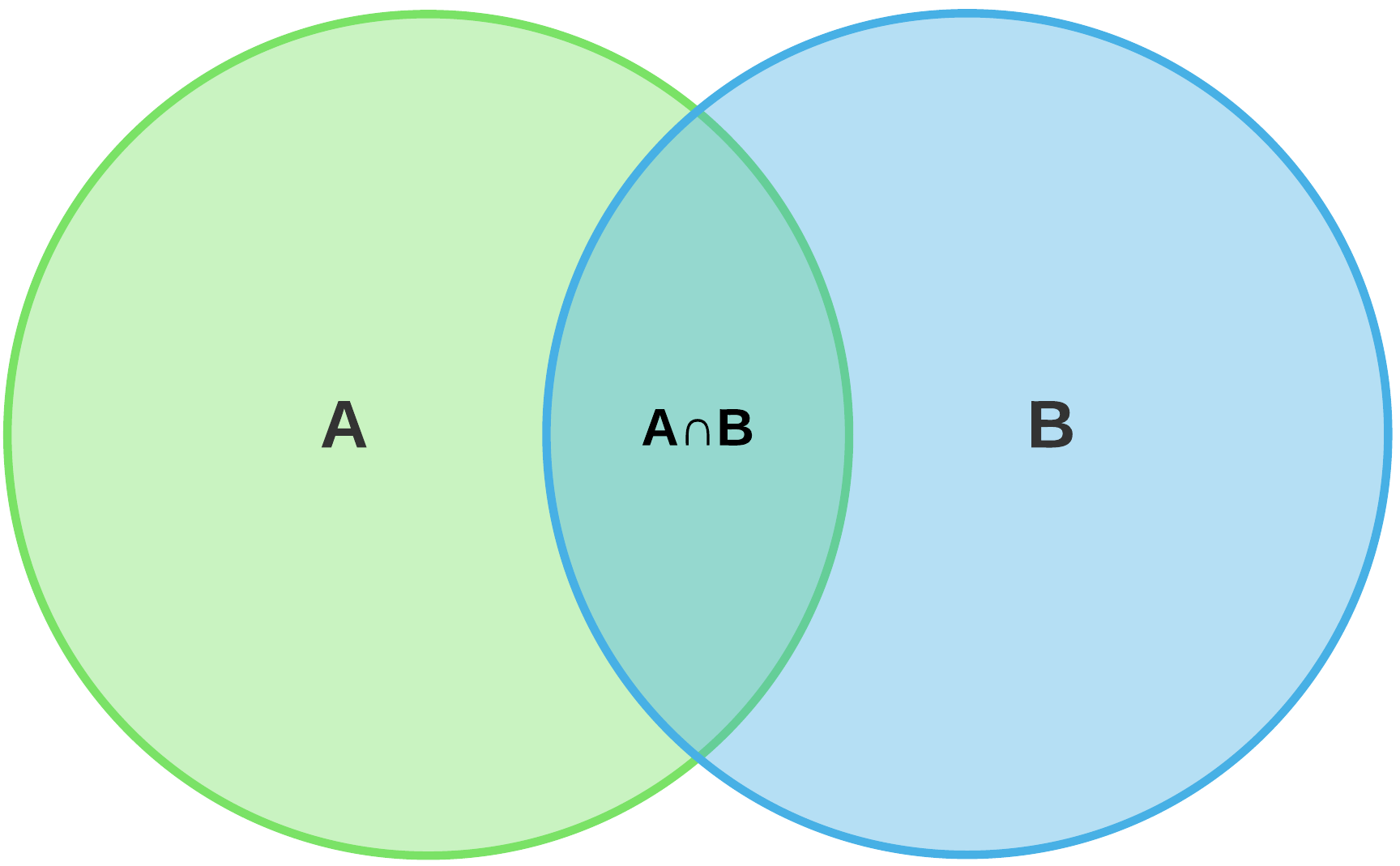
Example: Find Contacts
Include: Top Prospects Group, Lobbyists Group, Bundlers Group
Exclude: Do Not Contact Group, Bad Table Manners Group
Operators
Is In All [AND] = Overlap
- If More than 1 Group Selected, this will Find the Overlap of the Groups
(AnB intersection Above)
Is In Any [OR] = All Groups Selected
- If More than 1 Group Selected, this will Find Contacts in All of the Groups
(A + B below)
Group Notes: Finds for Content in the Group Notes (Specific to the Group)
Addresses
Find For Contacts with Addresses
Financials
Financials - Donations, Pledges, Cum Totals, etc
Campaign (Campaign / Client)
Committee (Optional - within Campaign)
Donation Account (Optional - within Campaign)
Donation Date (Use Operators for Date Ranges)
Donation Line Item ($Each Donation - Use Operators for Ranges)
Donation Cum. Total ($Totals Donation - Use Operators for Date Ranges)
Total Lifetime Giving ($Total Lifetime Giving across All Campaigns)
Num of Donations (from Contact $Totals - per Campaign)
Donation History Text ($Totals > Donation History Text: Text Content )
Thank You (Yes / No)
Thank You Date (Dates & Ranges)
Source (Donation Source: iDp = Entered, Anedot, Win Red, etc.)
Pledge Date (Dates & Ranges)
Pledge Amount ($Each Pledge - Use Operators for Ranges)
Pledge Balance ($Each Pledge - Use Operators for Ranges)
Financial Activity (Update or Create Date for Pledges and Donations)
Events
Find for Contacts who have Attended Events:
Campaign, Event Date, Event Name, Number Attending, VIP, Dinner, Code
Contacts
Find for Specific Contact Info
| Contacts |
| Contact Type |
| Political Party |
| Picture |
| Prefix |
| First Name |
| Middle Name |
| Last Name |
| Suffix |
| Salutation |
| Formal Salutation |
| Title |
| Company |
| Employer |
| Occupation |
| Industry |
| Mail Name |
| Household Name |
| Spouse |
| Assistant |
| Capacity |
| Gender |
| Birthday |
| Birth Month |
| Archived |
| Deceased |
| Tracking ID |
| Bundler |
| Bundler ID |
| Quick Note |
| Created Date |
| Modified Date |
Phone Numbers
| Phone Number |
| Phone Verified Date |
| Phone Type |
Email Addresses
| Email Address |
| Email Verified Date |
Contact Notes
| Notes Subject |
| Notes Body |
Other
| Alumni |
| Bio |
| Website |
Calls & Meetings
| Campaign |
| Committee |
| Call/Meeting Type |
| Assigned To |
| Status |
| Call Response |
| Date |
| Date Complete |
| Subject |
| Note |